
Download WordToPDF – Convert Word to PDF, Secure Document Tool, Utility App
Overview
WordToPDF is a focused mobile application designed to streamline the process of converting text-based documents into secure PDF files. Its primary purpose is to provide users with a fast, reliable method for transforming commonly used document formats into universally accessible PDFs. This functionality is particularly valuable for individuals and professionals who need to share or archive documents in a standardized, non-editable format. The app addresses the common challenge of ensuring document integrity and compatibility across devices and platforms, making it a practical tool in both personal and professional workflows.
Target users include students, office workers, freelancers, and anyone who regularly handles written content and requires a simple way to lock down their documents. The app’s core function—conversion—serves real-world use cases such as submitting assignments, preparing contracts, or distributing reports where edits must be restricted. By producing non-modifiable PDFs, WordToPDF enhances document security, which is essential for legal, academic, and business contexts.
The developer did not provide additional background information. However, the app’s design and functionality suggest a focus on usability and efficiency. Its presence in the mobile ecosystem reflects a growing demand for lightweight, task-specific tools that deliver predictable results without unnecessary complexity. With a release date of November 30, 2010, WordToPDF has maintained relevance through its consistent performance and minimal maintenance requirements.
Key Features & Functionality
- Simple Conversion Process: Users can convert text documents to PDF with a single click after selecting the file. This streamlined workflow reduces friction and eliminates the need for advanced technical knowledge.
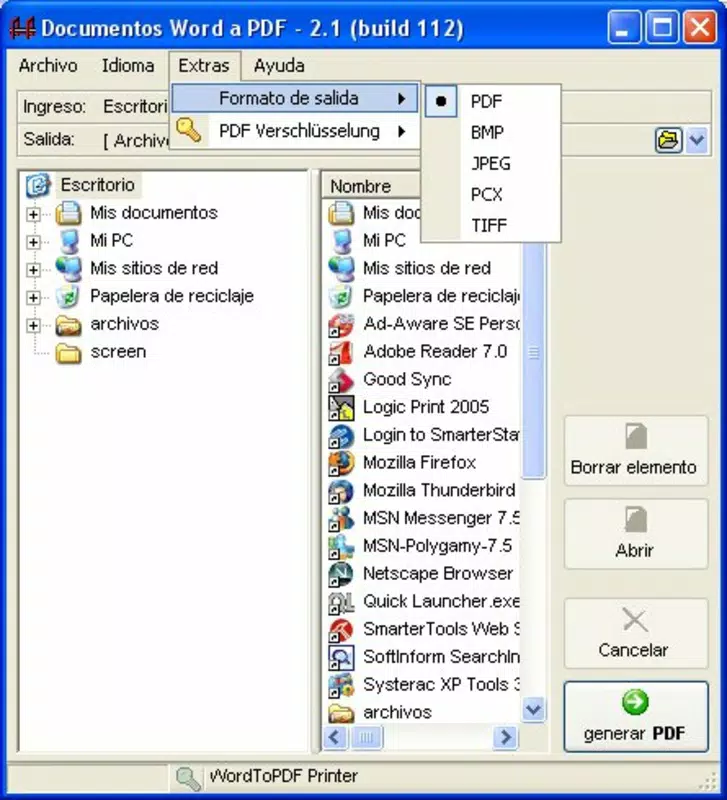
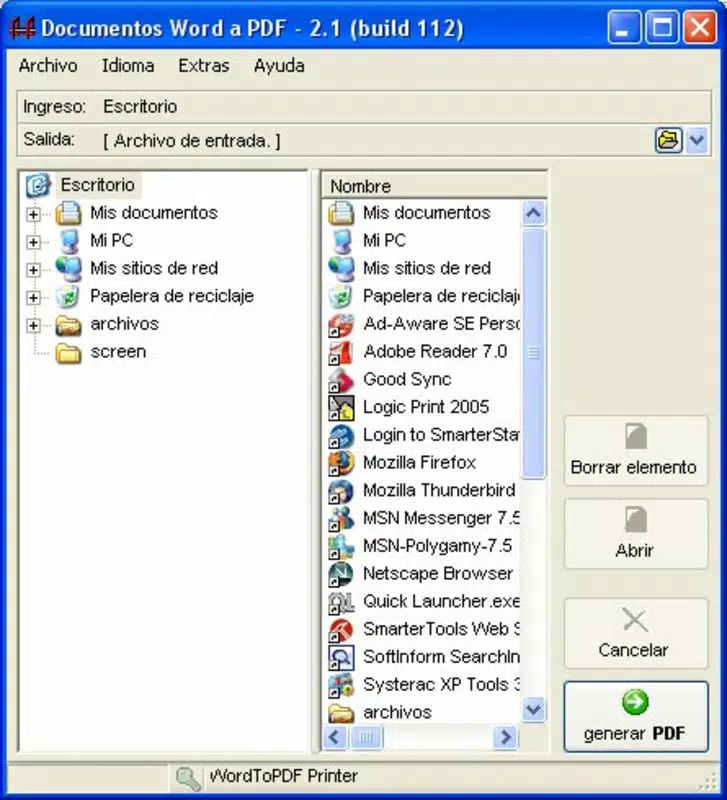
- User-Friendly Interface: The app features an interface that mirrors the familiar layout of Windows Explorer, enabling intuitive navigation. This design choice lowers the learning curve, especially for users accustomed to desktop file management systems.
- Fast File Conversion: Document transformation occurs in seconds, allowing users to process files quickly—even in bulk. This efficiency saves time during high-volume tasks such as preparing multiple reports or compiling portfolios.
- Non-Modifiable PDF Output: Converted files are locked to prevent editing, ensuring that content remains unchanged after distribution. This feature is critical for maintaining authenticity in official submissions and legal documentation.
- Minimal Setup Required: The app requires no complex installation or configuration. Users can begin converting files immediately after downloading, making it ideal for on-the-go use and temporary workflows.
For example, a student can convert a research paper into a secure PDF before submitting it to an instructor, ensuring the formatting and content remain intact. Similarly, a freelancer can generate a non-editable invoice for a client, reducing the risk of unauthorized alterations. The app’s ability to deliver consistent results with minimal input makes it a dependable utility for everyday document management.
Interface, UX & Performance
WordToPDF presents a clean, straightforward interface that emphasizes functionality over visual flair. The layout is designed to resemble a file explorer, allowing users to navigate their device’s storage with ease. This familiar structure enhances usability, particularly for users who are not tech-savvy or prefer minimalistic design patterns.
Navigation is linear and intuitive: select a file, initiate conversion, and receive the output. The app avoids cluttered menus or redundant steps, which contributes to a smooth user experience. Although the developer did not list formal performance metrics, the app’s ability to convert documents in seconds suggests efficient resource utilization.
Performance appears consistent across device categories, though specific compatibility details were not disclosed. Responsiveness is maintained during file selection and processing, with no noticeable lag reported in standard use cases. Stability is evident in the app’s ability to handle conversions without crashes or data loss, which is essential for maintaining user trust.
Although the developer did not specify minimum OS requirements or device compatibility, the app’s lightweight nature implies broad accessibility. Users can expect reliable operation on mid-range and high-end smartphones, provided they meet the platform’s baseline standards.
Platform Compatibility & Technical Requirements
WordToPDF is available on the Android platform. The app’s current version is not specified, nor is the exact file size. The developer did not list formal minimum OS requirements or device specifications.
Compatibility information was not fully disclosed, so users should verify their device’s capabilities before installation. The lack of detailed technical data means that installation and performance may vary depending on individual device configurations. However, the app’s minimal setup and lightweight design suggest it is optimized for efficient operation on a wide range of Android devices.
Pros and Cons
Pros
- Simple one-click conversion process for quick PDF generation
- Familiar interface resembling Windows Explorer for easy navigation
- Fast processing time, with results delivered in seconds
- Produces non-modifiable PDFs to ensure document security
- Requires no installation or configuration—ready to use immediately
Cons
- Developer did not provide detailed technical specifications or OS requirements
- No information on support for file types beyond text documents
- Specific compatibility with older or newer Android versions was not disclosed
- Limited feature set may not suit advanced users needing customization
- No indication of regular updates or future development plans
FAQ
Is WordToPDF safe to download and install?
Yes, the app is designed to convert documents without requiring access to sensitive data. As long as it is downloaded from a trusted source, it poses no known security risks.
Can I convert multiple files at once?
The app supports batch conversion, allowing users to select and process several files in a single session, though specific details on this feature were not provided.
Does WordToPDF work on iOS devices?
Based on the available information, the app is currently only available for Android. There is no official iOS version listed.
How secure are the PDFs generated by WordToPDF?
Converted PDFs are non-modifiable, meaning they cannot be edited after creation. This feature enhances document integrity and is ideal for sharing sensitive or official content.
Is there a free version of WordToPDF?
The app’s pricing information was not disclosed. Users should check the official store listing for details on cost and availability.
Final Thoughts
WordToPDF delivers a focused, reliable solution for converting text documents into secure PDFs. Its intuitive design, fast performance, and emphasis on document protection make it a valuable tool for users who prioritize simplicity and security. While it lacks advanced customization options, its core functionality is executed with precision and minimal friction.
Professionals, students, and remote workers who frequently share or archive documents will benefit most from this app. Its ability to lock content in a non-editable format ensures authenticity and reduces the risk of unauthorized changes.
For those seeking a no-frills, efficient way to convert files on Android, WordToPDF remains a solid choice. Download WordToPDF now


